How to Get Verified on Spotify (2026): Complete Step-by-Step Artist Verification Guide
Getting verified on Spotify builds credibility and unlocks powerful tools. Here’s exactly how to claim your Spotify for Artists profile step by step.

Updated for 2026: Musicians need every advantage to stand out in a crowded market. One advantage is getting verified on Spotify.
With over 600 million active users, including 230 million premium subscribers, Spotify is a key platform for artists seeking increased visibility and credibility.
Getting that coveted Spotify blue tick next to your name can significantly boost your presence on the platform. Here’s a comprehensive guide to help you navigate the verification process on Spotify.
ステップ1: 音楽をリリースするSpotify
Before you can get a verified profile, your music needs to be on Spotify. This involves uploading your tracks through a music distributor such as Symphonic, CD Baby, or DistroKid. Ensure your music is live on Spotify before proceeding with the next steps.
in to
If you're using DistroKid, you might wonder how long it takes DistroKid to upload to Spotify. Typically, it takes a few days, so plan accordingly.
Step 2: Log in to your Spotify Account
To start the verification process, you'll need to go to the Spotify for Artists login. You can log in with your existing Spotify credentials or create a new account if you don't have one.
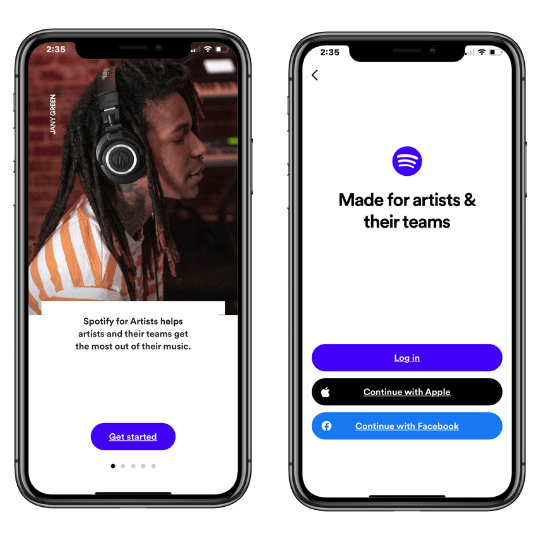
Step 3: Claim Your Artist Profile on Spotify for Artists
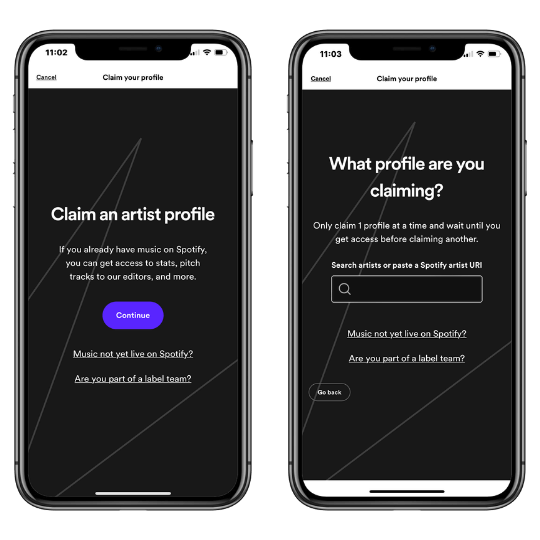
After logging in, search for your artist profile by typing in your artist name or pasting a URL link to your Spotify profile. This step ensures that Spotify links the correct profile to your account. Double-check to make sure all the information matches your artist profile.
Spotify will then ask you to identify yourself as an artist, manager, or label team member, and then you can claim your Spotify artist profile.
ステップ4:追加情報の提供
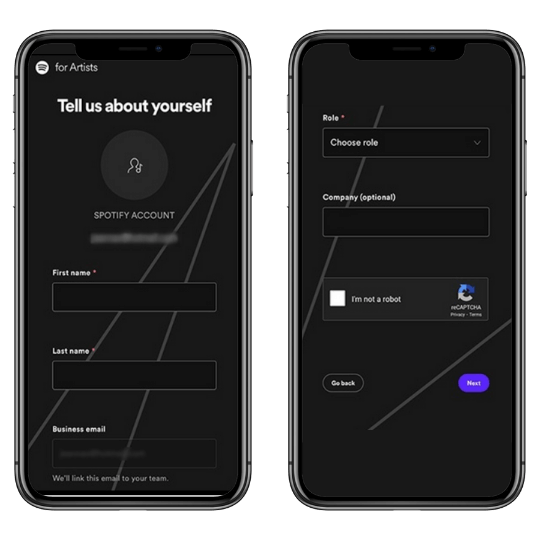
After selecting your artist account, Spotify will ask for some basic information to complete your verification. This includes:
姓名
ビジネスEメール
役割(アーティスト、マネージャーなど)
会社名(該当する場合)
この情報は、Spotify 、あなたの身元を確認し、適切なプロフィールに接続するのに役立ちます。
Step 5: Verify Your Spotify For Artists Submission
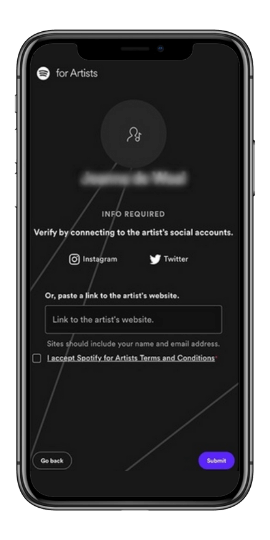
To finalize your verification, you must connect your Spotify account to your social media profiles (Instagram or Twitter) or provide a link to your official artist website.
This step confirms your identity and ensures that you are the legitimate owner of the artist profile. After connecting your social media or website, click “Submit” to complete the process.
What to Expect After Submitting Your Spotify For Artists Verification Request
認証リクエストを送信すると、Spotify 、通常数日かけて審査・承認されます。プロフィールのアーティスト名の横に青いSpotify アイコンが表示されたら、認証されたことがわかります。あなたの提出が拒否された場合、Spotify は通常理由を提示し、問題を修正して再申請できるようにします。
認証取得のメリットSpotify
Getting the verified tick on Spotify offers several benefits that can enhance your music career.
信頼性の向上
ブルーのSpotify ロゴは信頼性を示し、あなたのプロフィールが正当なものであることをファンや業界関係者に安心させます。これは、Spotify で認証済みアーティストになる方法を迷っているアーティストにとって非常に重要です。
プロフィールのカスタマイズ
Spotify 認証されたアーティストは、プロフィール画像を更新し、経歴を追加し、カスタム画像を含めることができます。
Spotify アーティスト・プロフィールの設定方法はこちらをご覧ください。
Spotify for Artists Featuresへのアクセス
認証されたアーティストは、 'のエディトリアル・プレイリストに未発表曲を投稿することができ、フィーチャーされる可能性が高まります。Spotify
アーティスト・ピック
この機能では、トラック、アルバム、プレイリストをプロフィールのトップにピン留めすることができます。また、今後のライブ日程を共有したり、カスタム画像を追加してプロフィールのビジュアルアピールを強化することもできます。
結論
Getting verified on Spotify is a straightforward process that can significantly boost your visibility and credibility on the platform. By following the steps outlined above, you can unlock a range of features designed to help you promote your music and engage with your audience more effectively.
Don’t wait—start your Spotify verification process today and take your music career to the next level. If you need further assistance, the Spotify help page offers detailed guides and support.
よくある質問
Spotify アーティストアカウントの作り方は?
If you're wondering how to create a Spotify Artist account, start by signing up for a regular Spotify account if you don't already have one. Next, distribute your music to Spotify using a music distributor such as Symphonic, CD Baby, or DistroKid, which will handle the process of uploading your tracks.
Once your music is live, visit Spotify for Artists, log in with your Spotify account, and claim your artist profile by searching for your artist name and providing the necessary verification information.
Spotify 、認証されるまでにどれくらいの時間がかかりますか?
アーティストの場合、Spotify for Artistsによる認証は、申請書を提出し、承認されてから通常数日かかります。アクセスが許可されると、確認のチェックマークが自動的に表示されます。
Spotify 、認証にはいくらかかるのですか?
Spotify での認証は無料です。Spotify for Artistsで自分のプロフィールを主張しているアーティスト、Spotify for Podcastersで自分のポッドキャストを主張しているポッドキャスター、または検証を求めている著名人のいずれであっても、検証プロセスは無料です。
Spotify で認証されるとはどういう意味ですか?
Spotify で認証されるということは、 、あなたのプロフィールが本物で公式なものであると認証されたことを意味します。アーティストの場合、この認証によってプロフィール名の横に青いチェックマークが表示され、リスナーにそのプロフィールがそのアーティストの公式なものであることが示される。ファンとの信頼関係を築くのに役立ち、アーティストの信頼性を高めることができます。認証により、 for Artistsを通じて追加機能や分析にアクセスすることができ、より良いオーディエンスのエンゲージメントと管理が可能になる。Spotify
Spotify
Spotify アーティストになるには
Spotify アーティストになるには、まず音楽を制作して録音することから始めましょう。Symphonic、TuneCore、Distrokidなどのデジタル音楽配信業者を利用して、 。音楽が公開されたら、 for Artistsで身元を確認し、プロフィールを申請してください。写真、経歴、ソーシャルメディアへのリンクでプロフィールをカスタマイズし、あなたのブランドを構築してください。ソーシャルメディアやSpotify
Spotify
Playlist Pushなどのプラットフォームを通じて音楽を宣伝し、 for Artistsを通じてプレイリスト候補に曲を投稿してください。Spotify
音楽のプロモーションをお考えですか?
Use our Spotify Playlist Submissions or TikTok Promotion service.